LLM as sysadmin: 59,349 commands, 2,355 VMs, and the illusion of done
LLM as sysadmin: 59,349 commands, 2,355 VMs, and the illusion of done
Teams are already using LLMs to operate systems, with or without a human in the loop. Yet there's very little public data on the full impact of these agents on infrastructure. So, I ran an experiment and recorded every run. I present my findings below.
For each run, I gave Claude Sonnet 5 a sysadmin task and access to an isolated cluster of one to four virtual machines. Some tasks began on a clean installation. For others, the test system first created a specific starting condition, such as configuration drift or a nearly full disk. The model then received the task in plain language, decided which commands to run, executed them on the machines, and reported when it was finished. No human intervened during a run.
Across all attempts, the experiment created 922 isolated test environments containing 2,355 virtual machines. Seventeen attempts ended because of failures in the surrounding test system and were excluded from the LLM results. The remaining 905 are counted as LLM runs: 837 passed and 68 failed. Together, they produced 59,349 commands.
The experiment uses two tools. Harbor is the harness: it gives the model each task and records its messages, commands, and results. Antrieb provides the testbed by creating the isolated virtual machines and networks on which the model works, including multi-node environments spanning L2 through L7. The highest concurrency reached was 50 VMs.
The raw data is on GitHub and Hugging Face. I welcome new tasks, runs, or analyses of the records.
Commands: 59,349 · Runs: 905 · VMs: 2,355 · Pass rate: 92.5% · Residue: 44.5% · OS: AlmaLinux 9, Alpine, CentOS Stream 10, RHEL 7.9 / 9.8 / 10.0, Ubuntu 16.04 / 24.04 · Network OS: VyOS, OPNsense, OpenWrt, SONiC · Machines per run: 1–4
At a glance
- 1. LLMs pass most jobs: The LLM met all functional requirements in 92.5% of runs.
- 2. LLM-friendliness varies by component: LLM success varies by component and, within a component, from release to release.
- 3. The leftovers: at least 44.5% of runs left something behind: Records show leftovers in 403 runs, some with passwords, keys, or certificates.
- 4. Configuration is cheap. Coordination is expensive: Single-machine work took 3 to 4 minutes, while stateful clusters took 10 to 25 minutes.
- 5. High-impact commands are common: At least one high-impact command appeared in 47.7% of runs.
- 6. Unclear provenance for repository URLs: LLM configured OS repositories in 29 runs and used URLs that failed DNS resolution in 4 cases.
- 7. Firewall changes disappear after reboot: Happened in 11.4% of firewalld cases despite the prompt stating that changes must survive reboot.
- 8. The simple-task trap: Completion time is unpredictable: a file-integrity task took 32 minutes on Ubuntu 24.04 and 6 minutes on Alpine.
In detail
1. LLMs pass most jobs
A run passes only when every requirement was met. By that definition, 837 of 905 runs passed and 68 failed, giving a pass rate of 92.5%.
To determine whether a run passed, I recorded the state of every machine at three points: before the test system prepared the machines for the task, after that preparation and immediately before the LLM began, and after the LLM finished. Each snapshot records whether the machine rebooted, its operating-system release, files under /tmp, failed services, listening ports, and package-manager health. The complete command log includes every command, its output, and any errors.
After the run, a separate LLM evaluated each requirement in the task. It worked from the task description, the network layout, the complete command log, the three snapshots, and the commands and outputs the first LLM cited as proof of completion. The resulting report assesses every requirement separately and links each decision to the relevant command or snapshot. These records are stored with every run as verifier/global-observations.json, verifier/executor-evidence.json, and verifier/evaluation-report.json. This makes it possible to check the decision against the same information the verifier received (example report).
Pass rate by category
Each category groups similar work: single-machine Linux administration, multi-machine Linux administration, clustered services, or networking tasks for a particular network operating system.
| Category | Runs | Passed | Rate |
|---|---|---|---|
| multi-node-os-comparison | 78 | 78 | 100% |
| single-node-os-comparison | 242 | 233 | 96% |
| vyos-networking | 82 | 77 | 94% |
| opnsense-networking | 80 | 74 | 93% |
| sonic-networking | 80 | 73 | 91% |
| clustered-services | 191 | 170 | 89% |
| vyos-opnsense (cross-vendor) | 80 | 71 | 89% |
| openwrt-networking | 72 | 61 | 85% |
2. LLM-friendliness varies by component
The command fail rate counts commands that returned a non-zero exit status, divided by all commands for which the target machine returned an exit status. This measures individual command attempts. A run passes only when the final state of the machines meets every requirement in the task.
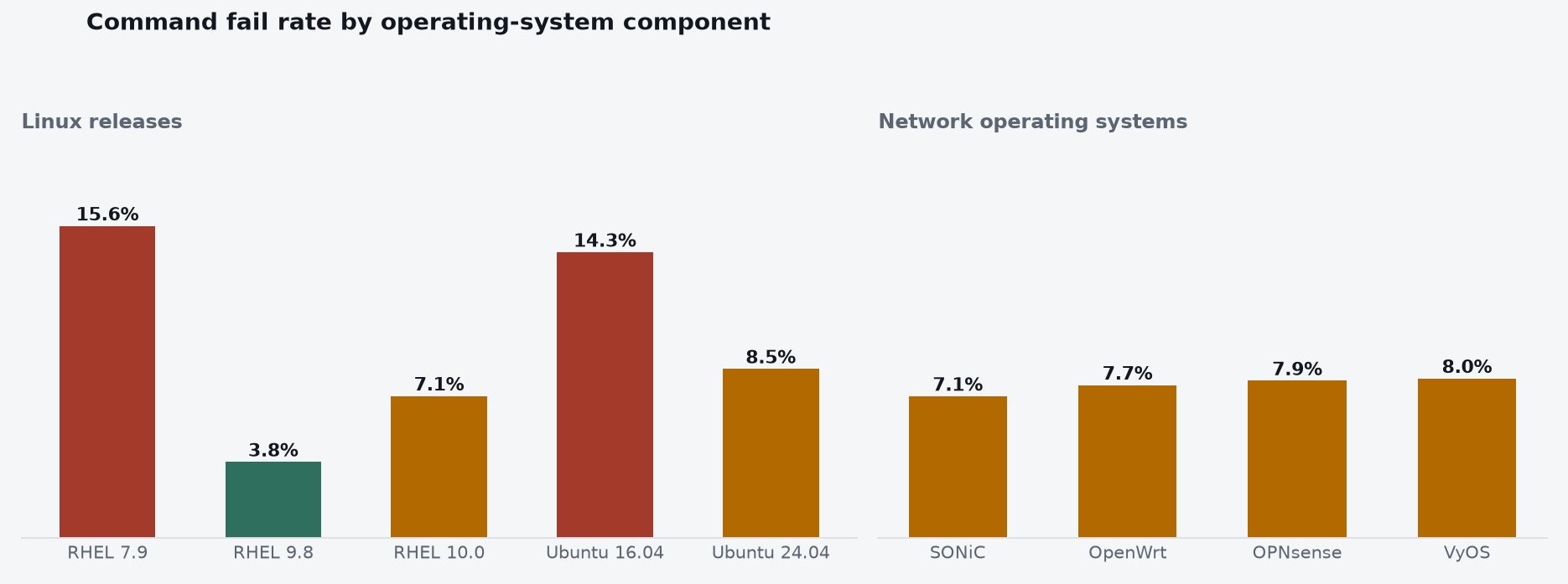
Commands failed four times as often on RHEL 7.9 as on RHEL 9.8 when the model ran the same 29 tasks with the same wording. Ubuntu follows the same direction, with a weaker effect.
The network operating systems cluster more tightly, with command fail rates on their devices ranging from 7.1% on SONiC to 8.0% on VyOS. The network tasks still fail more often: a command can succeed while configuring the wrong interface, route or destination.
I suspect that an important factor in this failure rate is how much material about a release exists publicly, and how long that material has stood before a newer version supersedes it. RHEL 9 superseded all previous RHEL versions, including 7, so most of what the model has read about RHEL describes 9 rather than 7. RHEL 10 is newer than RHEL 9, but it has not superseded RHEL 9 in the written record yet, which would explain why it fails more often than the release it replaces.
The Linux release numbers exclude the file-integrity task because it skews Ubuntu results. Finding 8 explains that run.
3. The leftovers: at least 44.5% of runs left something behind
After every run, I used the command log and the recorded state of the machines to identify what the LLM had left behind. This includes temporary files, logs, debugging packages, running services, test accounts, test data, and configuration changes that were no longer needed when the work ended.
I counted only unnecessary state introduced by the LLM and still present when the run ended. I excluded anything required by the completed task, anything already on the machine, files or changes created by the test system while preparing the task, and changes the LLM cleaned up. I also excluded files created by the experiment itself, such as the logs used to track required reboots.
The records clearly show leftovers in 403 of 905 runs, or 44.5%. They show no leftovers in 415 runs. For 87 runs, the available information is insufficient to decide.
Leftovers across all 905 runs
| What the records show | Runs | Share |
|---|---|---|
| Left something behind | 403 | 44.5% |
| No leftovers found | 415 | 45.9% |
| Could not determine | 87 | 9.6% |
| Total | 905 | 100% |
What the LLM left behind
| What was left behind | Runs | Share of runs with leftovers |
|---|---|---|
| Temporary files, logs, and installer leftovers | 317 | 78.7% |
| Firewall, network, and system configuration | 136 | 33.7% |
| Running processes and services | 98 | 24.3% |
| Passwords, keys, and certificates | 75 | 18.6% |
| Extra packages and software repositories | 61 | 15.1% |
| Accounts and access permissions | 43 | 10.7% |
| Backup files | 43 | 10.7% |
| Test and application data | 15 | 3.7% |
A run can appear in more than one row. The table counts runs, since a single run may leave several files or affect several machines. The calculation script and complete run-by-run results are included with the dataset.
Anything left behind can create risk. A debugging package becomes more software that must be patched. A service that was stopped for testing may have been responsible for auditing or sending logs to another system.
Seventy-five runs left passwords, keys, or certificates. One example is /tmp/pgca/ca.key, the signing key of the certificate authority the model created for a PostgreSQL cluster (post-run snapshot, line 44). The dataset also contains WireGuard private keys and client keys left behind after runs.
That certificate-authority key can sign certificates for every node in its cluster. Anyone who can read it can mint a certificate the cluster trusts.
4. Configuration is cheap. Coordination is expensive
Run time increases when two or more machines have to agree on replication, quorum, state transfer or failover. The model must demonstrate the result through a real change in the running system instead of reading it from a configuration file. The table shows the observed completion-time ranges across three types of task.
Observed completion-time range by task type
| Task type | Observed run range |
|---|---|
| Single-host administration | 3–4 min |
| Routed / firewalled networks | 6–13 min |
| Stateful clusters (replication, quorum) | 10–25 min |
A PostgreSQL failover on Ubuntu 24.04 reached the experiment's 35-minute time limit. The same model completed single-machine tasks in three minutes on the same hardware and the same day.
5. High-impact commands are common
I scanned all 59,349 commands for five explicit classes of high-impact shell operations. At least one class appeared in 1,694 commands across 432 of 905 runs, or 47.7% of the runs.
High-impact command classes
| Class | Matched forms | Runs | Requests |
|---|---|---|---|
| Service stop | systemctl stop, service scripts | 219 (24.2%) | 530 |
| Forced process termination | pkill, killall, kill -9 | 184 (20.3%) | 642 |
| Recursive forced removal | rm -rf, rm -fr | 123 (13.6%) | 397 |
| Network-state flush | iptables -F, nft flush, ip route flush | 117 (12.9%) | 375 |
| Force or trust-bypass flag | --force, --nogpgcheck, insecure TLS flags | 13 (1.4%) | 28 |
The classification identifies the shell operation and does not decide whether its use was necessary. The matching rules are published with the dataset.
The combinations make the impact concrete. A PostgreSQL command stops the service and recursively removes its data directory before taking a fresh base backup (L83–L86). A MariaDB command combines systemctl stop with two pkill -9 operations and ends with return code 137 (L83–L84). An Alpine firewall script flushes the existing iptables chains and temporarily sets the default policies to ACCEPT before adding its replacement rules (L11–L12). A RabbitMQ run installs downloaded packages with signature checks disabled (L69–L74).
These operations are difficult to guard because the same primitives can be legitimate parts of the requested work. Rebuilding a replica can require emptying its data directory. A failover test can require stopping a service. Replacing a firewall policy can require clearing old rules. A rule that blocks rm -rf, systemctl stop, or iptables -F would also block intended administration. Allowing them gives the agent operations whose impact depends on the target path, the host's role, its current state, and the order of execution. Several traces also bundle stopping, deletion, replacement, and restart into one command request, leaving no simple boundary at which to approve only the safe part.
6. Unclear provenance for repository URLs
Installing software outside the distribution repositories often requires the LLM to configure a vendor repository or download a repository definition. The LLM configured OS repositories in 29 runs and used URLs that failed DNS resolution in 4 cases, or 13.8%.
All four failures occurred in RabbitMQ runs. The agent used el9.rabbitmq.com in three runs, two on AlmaLinux 9 and one on RHEL 9.8. The hostname failed DNS resolution. In the fourth run, the agent placed ppa1.rabbitmq.com in /etc/apt/sources.list.d/rabbitmq.list on Ubuntu 24.04. That address had been an official RabbitMQ repository, but RabbitMQ shut it down in November 2025, making it obsolete by the time of the experiment.
External repository URL attempts and DNS failures
| Repository hostname | Runs | DNS failures | Evidence |
|---|---|---|---|
| el9.rabbitmq.com | 3 | 3 | L7–L14, L11–L18, L15–L22 |
| ppa1.rabbitmq.com | 1 | 1 | L99–L120 |
| Other external repository URLs | 25 | 0 | Calculation |
| Total | 29 | 4 (13.8%) |
Incorrect URLs cause DNS failures, repository errors, retries, long waits, and fallback to distribution packages. Those fallbacks can change the software version and alter the result of the task. An address that resolves later to an unrelated service could direct repository configuration toward an unintended source.
7. Firewall changes disappear after reboot
Some Linux tools allow agents to create transient configurations that disappear after a reboot. This applies to both firewall-cmd and iptables.
I wanted to simulate how an administrator would actually use an LLM, so the prompts did not explicitly say to save every firewall rule permanently. They did tell the agent to reboot the machine after making its changes, which indicates that the configuration had to survive a restart.
firewall-cmd runs that never used --permanent
| Image | Runs | Left transient | Rate |
|---|---|---|---|
| RHEL 10.0 | 39 | 5 | 13% |
| CentOS Stream 10 | 53 | 7 | 13% |
| AlmaLinux 9 | 57 | 7 | 12% |
| RHEL 9.8 | 44 | 5 | 11% |
| RHEL 7.9 | 44 | 3 | 7% |
Across the 237 firewalld cases in the table, 210 runs, or 88.6%, left the firewall configuration working after reboot. In the remaining 27 runs, or 11.4%, the changes disappeared. The agent made the service work during the run, then reported success before the reboot exposed the missing persistence.
The consequence is a delayed operational failure. A service may be reachable when the agent finishes, then lose its required access after a routine restart. Cluster communication, remote administration, or firewall protection can fail later, when the original change is no longer in anyone’s immediate view.
8. The simple-task trap
A task that looks simple can produce a surprisingly complicated execution path when an LLM performs it. In the file-integrity-baseline task, the instruction was straightforward: establish an integrity baseline for /etc so later changes can be identified and reported. The LLM used AIDE, a Linux tool that scans files and records enough information to detect later changes.
Ubuntu 24.04 AIDE check
The command log shows how the LLM changed its approach after the first attempt took too long:
| Event | Evidence |
|---|---|
| First AIDE check exceeded the 120-second limit | L21–L22 |
| LLM relaunched AIDE in the background | L23–L24 |
| First status check found AIDE still running | L25–L28 |
| Next status check found AIDE complete | L29–L30 |
Most other releases completed the task in about four minutes on average. Alpine took 6 minutes, Ubuntu 16.04 took about 12 minutes, and Ubuntu 24.04 took 32 minutes.
The difference follows the size of the AIDE scan. Ubuntu 24.04 covered nearly 90,000 filesystem entries, Ubuntu 16.04 covered about 70,000, and the other releases generally covered 30,000 to 40,000. On Ubuntu 24.04, the first AIDE check ran longer than the 120-second limit for a foreground command. The LLM then relaunched AIDE in the background and repeatedly checked whether it had finished, sleeping for a fixed interval between checks. AIDE often finished while the LLM was sleeping, so the model did not see the result until the sleep ended. The same pattern repeated during later AIDE operations and added substantial delay.
The visible task may be simple while the model's approach introduces retries, background processes, repeated status checks, and timeout delays.
Open questions
1. The evaluation and analysis rely on LLMs
The verification method described in Finding 1 uses an LLM to decide whether each run met its requirements. I also used an LLM to generate Python scripts, then ran them against the recorded data to calculate the numbers in this article.
These uses of LLMs carry different risks. The verifier's judgment can vary because LLMs are non-deterministic. The scripts produce repeatable results once written, though they may contain bugs.
I initially tried writing a fixed verification script for each task. That approach did not scale across the number of tasks, operating systems, and network devices. Alternative verification and analysis approaches are being investigated, and input is welcome.
2. One model, one setting
Every run here was executed by Claude Sonnet 5 at medium reasoning effort. Nothing in the dataset says whether a different model, or the same model at a different effort, behaves the same way.
I believe most of these observations apply to current models generally. That is a belief, and it needs validating. At the very least, it would be useful to run the verifier again with the same model at a higher reasoning effort and compare the results.
The lab
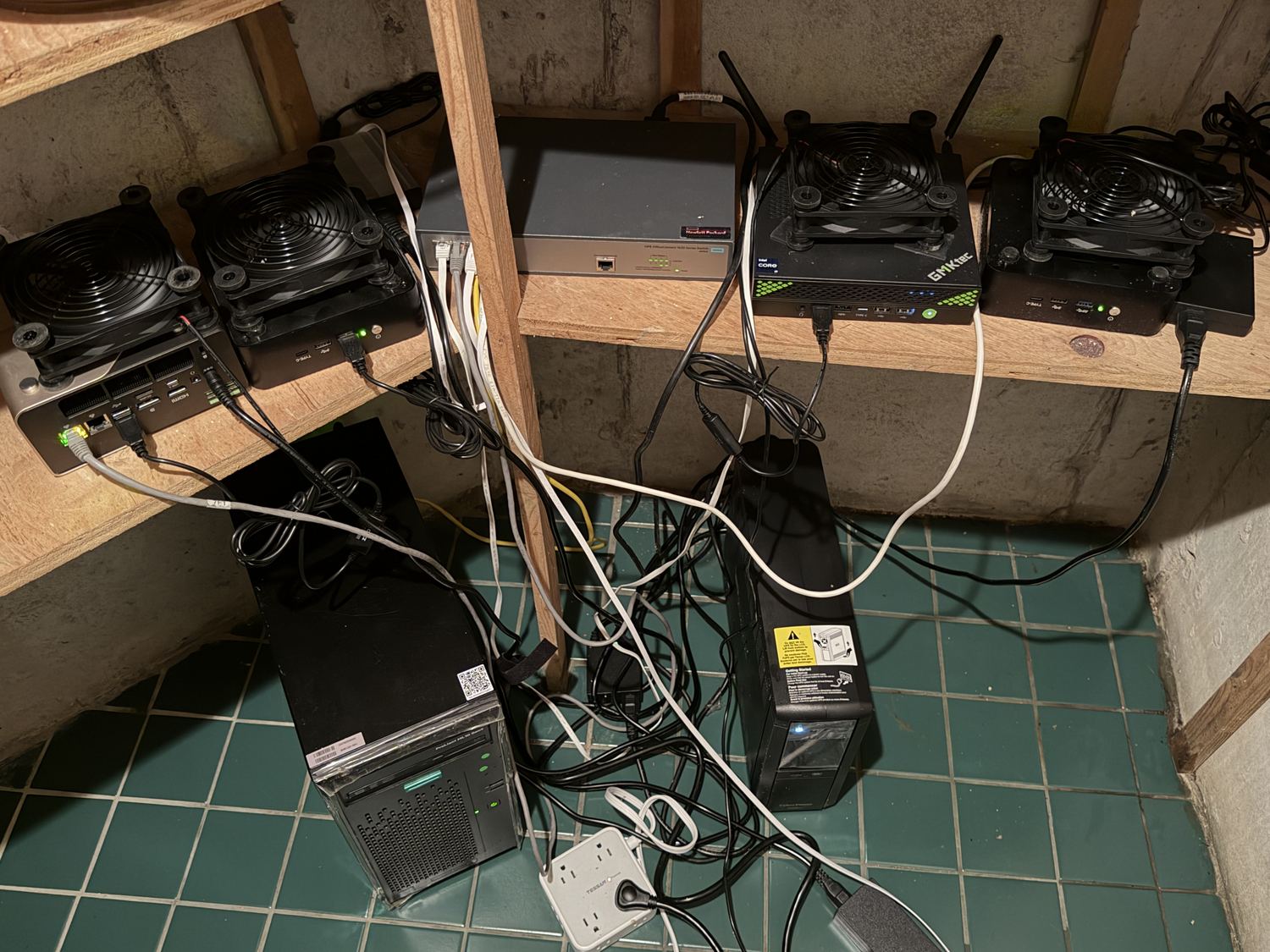
The Antrieb testbed running in my basement. USB fans keep the mini PCs cool while several virtual machines run at once.
All of it runs in my basement on five machines. The ProLiant coordinates the testbed; the four mini PCs run the virtual machines. An HPE OfficeConnect 1620 switch ties them together, and a UPS keeps the machines running through the short outages that would otherwise kill an experiment halfway through.
The fleet
| Machine | CPU | Threads | RAM |
|---|---|---|---|
| HPE ProLiant ML10 Gen9 | Xeon E3-1225 v5 | 4 | 62 GB |
| GMKtec NucBox K10 | Core i9-13900HK | 20 | 62 GB |
| GMKtec NucBox EVO-T1 | Core Ultra 9 285H | 16 | 62 GB |
| Mini PC | Core i9-13900HK | 20 | 62 GB |
| Mini PC | Core i9-13900HK | 20 | 62 GB |
What I take from this
A run passes only when every requirement was met. By that definition, the LLM passed 837 of 905 runs and failed 68, giving a pass rate of 92.5%. I tested on eight releases across five distributions, spanning ten years, on jobs ranging from a one-line kernel setting to a three-machine database cluster. This pass rate was surprising.
The records show that the LLM left unnecessary files or changes behind in at least 403 runs. Seventy-five runs left passwords, keys, or certificates. One PostgreSQL run left the signing key of the cluster's certificate authority in /tmp. Nearly half of runs contain at least one high-impact command class, while 11.4% of the firewalld configurations examined disappeared after reboot. Across 29 runs in which the LLM configured OS repositories, 4 used URLs that failed DNS resolution.
I suspect even more surprises are lurking in the data. Everyone is welcome to download the dataset and dig into it. Reach out if you have any questions. Everything is on GitHub and Hugging Face: every task, every command log, every result.