I ran an AI agent 905 times on sysadmin tasks using isolated virtual machines. The task evaluator marked 837 runs as passed, or 92.5%. A separate review examined all 905 runs for unnecessary files or changes left behind and found them in 403. The two counts describe different results: the requested work and the rest of the machine’s final state.
Each run used Claude Sonnet 5 at medium reasoning effort, with one to four machines and no human intervention. Some machines began clean; others had prepared faults or existing configuration. The tasks covered Linux releases from Ubuntu 16.04 to RHEL 10, as well as VyOS, OPNsense, OpenWrt and SONiC network systems.
There were 922 attempts in total, using 2,355 virtual machines. Seventeen attempts failed in the surrounding test system and were excluded. The remaining 905 model runs produced 59,349 commands. At peak, 50 VMs were running at once.
Harbor assigned tasks and recorded commands. Antrieb created the isolated machines and networks. The tasks, logs and results are on GitHub and Hugging Face.
1. Most runs passed the requested checks
A pass meant that a separate AI evaluator judged every stated task requirement met. It reviewed the task, network layout, commands, outputs, and machine snapshots. The snapshots recorded files, packages, services, ports, and reboot state before preparation, before the agent started, and after it finished.
Each decision was linked to evidence. The pass count records those evaluator judgments; the separate reviews below examined additional aspects of the runs.
Pass rates by task category
| Category | Runs | Passed | Rate |
|---|---|---|---|
| Multi-machine Linux tasks | 78 | 78 | 100% |
| Single-machine Linux tasks | 242 | 233 | 96% |
| VyOS networking | 82 | 77 | 94% |
| OPNsense networking | 80 | 74 | 93% |
| SONiC networking | 80 | 73 | 91% |
| clustered-services | 191 | 170 | 89% |
| VyOS–OPNsense networking | 80 | 71 | 89% |
| OpenWrt networking | 72 | 61 | 85% |
2. Command failures varied by system
For the same 29 tasks, commands failed four times as often on RHEL 7.9 as on RHEL 9.8. Network-device command failure rates were closer together: 7.1% on SONiC to 8.0% on VyOS. These comparisons show where the agent encountered more command failures.
Here, a failed command means a non-zero exit status among commands that returned a status. It is not a failed task: an agent can recover from several command errors and finish, or run successful commands against the wrong interface.
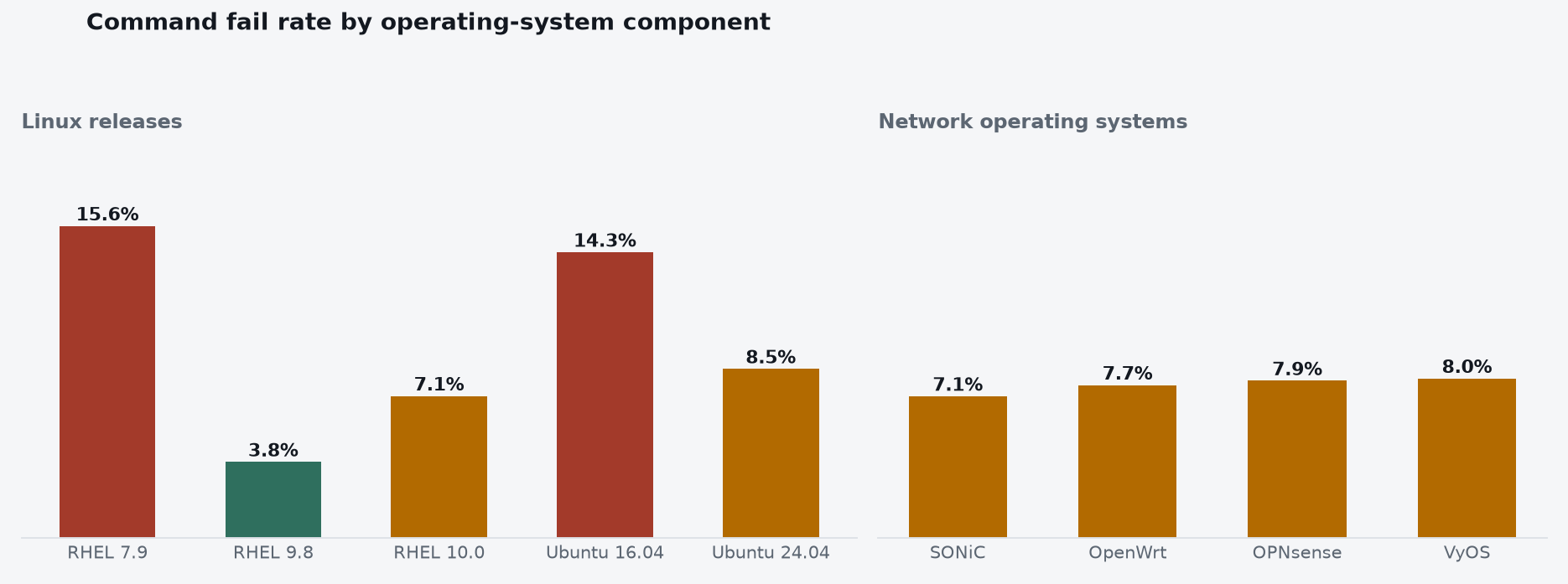
The Linux-release chart excludes the file-integrity task, whose long Ubuntu runs are discussed below.
3. Unnecessary files or changes remained in 403 runs
The review counted state introduced by the agent, no longer required by the task and still present at the end. It excluded existing configuration, test-system preparation, required service files and changes the agent cleaned up.
It found leftovers in 403 runs, none in 415, and insufficient information in 87. A run can appear in several categories because it may leave both files and configuration changes.
Leftover counts and categories
| What the records show | Runs | Share |
|---|---|---|
| Left something behind | 403 | 44.5% |
| No leftovers found | 415 | 45.9% |
| Could not determine | 87 | 9.6% |
| Total | 905 | 100% |
| What was left behind | Runs | Share of runs with leftovers |
|---|---|---|
| Temporary files, logs, and installer leftovers | 317 | 78.7% |
| Firewall, network, and system configuration | 136 | 33.7% |
| Running processes and services | 98 | 24.3% |
| Passwords, keys, and certificates | 75 | 18.6% |
| Extra packages and software repositories | 61 | 15.1% |
| Accounts and access permissions | 43 | 10.7% |
| Backup files | 43 | 10.7% |
| Test and application data | 15 | 3.7% |
Seventy-five runs left passwords, keys or certificates. One PostgreSQL run retained its certificate authority’s private signing key at /tmp/pgca/ca.key. Someone able to read that key could issue certificates trusted by the cluster. Other leftovers included test services, packages and settings that the next administrator would need to understand.
4. Multi-machine work took longer
Single-machine work generally took three to four minutes. Networking tasks took six to thirteen minutes, and stateful clusters ten to twenty-five. Replication and failover needed machines to coordinate and demonstrate recovery. One PostgreSQL failover on Ubuntu 24.04 reached the 35-minute time limit.
Observed completion times by task type
| Task type | Observed run range |
|---|---|
| Single-host administration | 3–4 min |
| Routed / firewalled networks | 6–13 min |
| Stateful clusters (replication, quorum) | 10–25 min |
5. Powerful commands appeared in nearly half the runs
A scan found at least one high-impact operation in 1,694 of the 59,349 command requests, across 432 of the 905 runs. It counted service stops, forced process termination, recursive deletion, network-state flushes, and force or trust-bypass flags. A single command request could match more than one category, so the category counts below overlap.
High-impact command counts
| Class | Matched forms | Runs | Requests |
|---|---|---|---|
| Service stop | systemctl stop, service scripts | 219 (24.2%) | 530 |
| Forced process termination | pkill, killall, kill -9 | 184 (20.3%) | 642 |
| Recursive forced removal | rm -rf, rm -fr | 123 (13.6%) | 397 |
| Network-state flush | iptables -F, nft flush, ip route flush | 117 (12.9%) | 375 |
| Force or trust-bypass flag | --force, --nogpgcheck, insecure TLS flags | 13 (1.4%) | 28 |
For example, one command stopped PostgreSQL and removed its data directory before taking a new base backup. That can be appropriate when rebuilding a replica and disastrous on the wrong host. Checking only the command name cannot establish whether its target, timing and purpose are acceptable.
6. Four repository configurations used hostnames that failed
The agent configured external OS repositories in 29 runs. Four used hostnames that failed DNS resolution: three used el9.rabbitmq.com and one used ppa1.rabbitmq.com. The latter had been official, but RabbitMQ had shut it down in November 2025.
The failed hostnames caused retries and fallback installations. In these runs, the agent’s repository configuration referred to a server that DNS could not resolve.
Repository hostnames and recorded failures
| Repository hostname | Runs | DNS failures | Evidence |
|---|---|---|---|
| el9.rabbitmq.com | 3 | 3 | L7–L14, L11–L18, L15–L22 |
| ppa1.rabbitmq.com | 1 | 1 | L99–L120 |
| Other external repository URLs | 25 | 0 | Calculation |
| Total | 29 | 4 (13.8%) |
7. Some firewall commands changed only the running configuration
The command review covered 237 runs that used firewalld. In 27, or 11.4%, the trace contained no use of --permanent. This count identifies how the commands were issued; it is not a count of independently confirmed outages.
A port opened only in firewalld’s runtime configuration loses that opening when firewalld restarts. A service can therefore answer during setup and become unreachable after reboot if the required rule was never saved.
Firewall results by Linux release
| Image | Runs | No --permanent flag | Rate |
|---|---|---|---|
| RHEL 10.0 | 39 | 5 | 13% |
| CentOS Stream 10 | 53 | 7 | 13% |
| AlmaLinux 9 | 57 | 7 | 12% |
| RHEL 9.8 | 44 | 5 | 11% |
| RHEL 7.9 | 44 | 3 | 7% |
8. A file-integrity check took 32 minutes
The file-integrity task asked for a baseline of /etc. On Ubuntu 24.04, the agent used AIDE’s supplied configuration, whose catch-all rule also included paths outside /etc. The initial database contained 87,378 entries, and the whole task took 32 minutes. The configuration and initialization output show that broader scan.
One AIDE check exceeded the command tool’s 120-second limit. The agent relaunched it in the background and waited fixed intervals before checking again. Some waits continued after AIDE had finished. The broad scan and repeated waits both lengthened the job.
Recorded timeout and background checks
The requested result and the remaining machine state
All 905 runs used Claude Sonnet 5 at the same reasoning setting. Within that experiment, the task scores and the separate reviews answered different questions. A service could satisfy its immediate checks while leaving extra access, temporary files, or changed system settings behind.
The records show both the work the agent completed and the changes that accompanied it. Those changes matter to whoever operates the machine after the agent finishes.
The lab
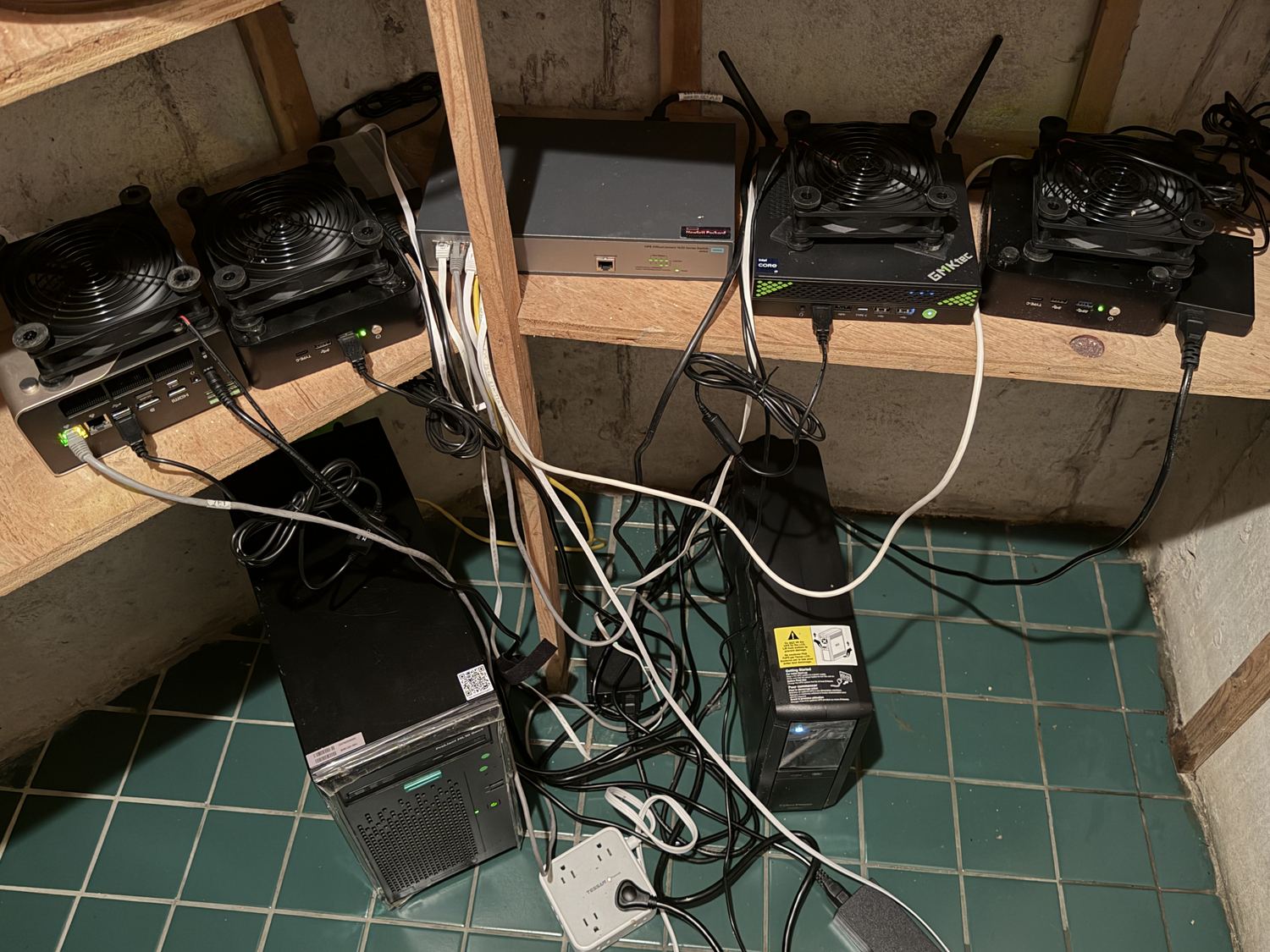
The experiment ran in my basement. An HPE ProLiant coordinated four mini PCs that hosted the VMs, connected through an HPE switch and backed by a UPS. USB fans kept the mini PCs cool.
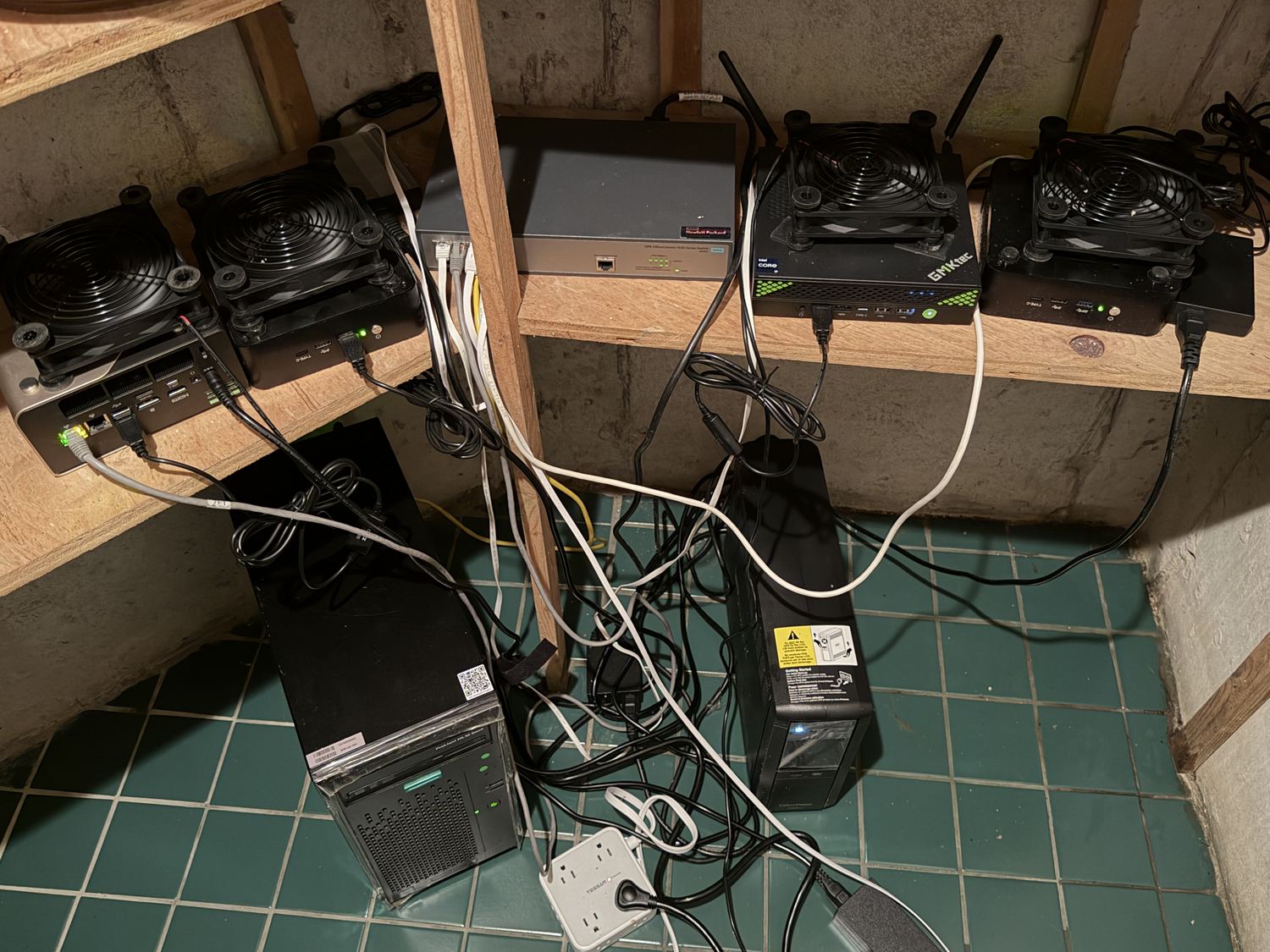
Lab hardware
| Machine | CPU | Threads | RAM |
|---|---|---|---|
| HPE ProLiant ML10 Gen9 | Xeon E3-1225 v5 | 4 | 62 GB |
| GMKtec NucBox K10 | Core i9-13900HK | 20 | 62 GB |
| GMKtec NucBox EVO-T1 | Core Ultra 9 285H | 16 | 62 GB |
| Mini PC | Core i9-13900HK | 20 | 62 GB |
| Mini PC | Core i9-13900HK | 20 | 62 GB |
Supporting records and references
Assessment · Documentation · Source record · Documentation 2 · Recorded commands · Recorded commands 2 · Recorded commands 3 · Recorded commands 4